When someone says they want to “learn WordPress,” they’re rarely talking about one skill. WordPress is more like an iceberg: what you see on the surface — writing posts, editing pages — sits on top of progressively deeper layers of knowledge. The good news for beginners is that you don’t need to learn it all. You just need to know which layer you’re standing on, and what’s underneath if you ever want to dig deeper.
Here’s how I break it down for new learners:
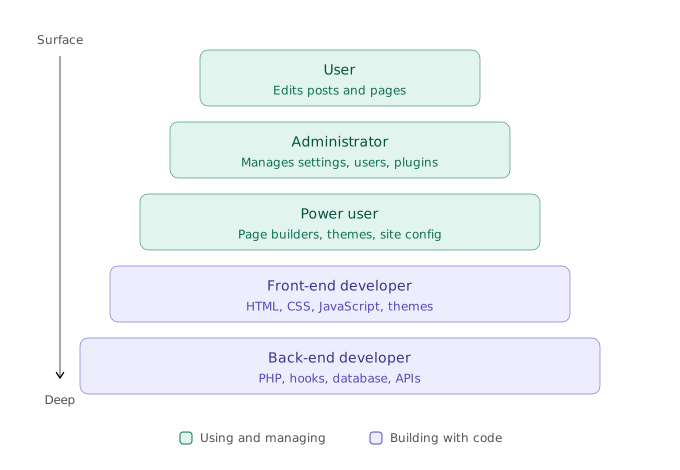
Layer 1: The user
This is where everyone starts, and honestly, where most people can happily stay. As a user, you learn to write and edit posts, create pages, upload images, and work with the block editor (Gutenberg). Your world is the content itself. If you can use a word processor, you can learn this layer in an afternoon — and it’s all most contributors to a site will ever need.
Layer 2: The administrator
Administrators keep the site running. This layer adds the wp-admin dashboard beyond the editor: managing users and their roles, installing and updating plugins, configuring settings, handling menus and widgets, and keeping backups. You’re not writing code, but you’re making decisions that affect the whole site — which plugins to trust, who gets which permissions, when to run updates. The learning here is less about buttons and more about judgment.
Layer 3: The power user
Power users bend WordPress to their will without writing (much) code. This is the world of page builders, theme customizers, custom fields, and clever plugin combinations. A power user can take a blank WordPress install and turn it into a portfolio, a store, or a membership site by assembling the right pieces. It’s the most underrated layer — a skilled power user can deliver 90% of what many sites need. Want to move something, make it look better, pop a little CSS here, load a plugin there, put an HTML clip in to embed an external resource.
Layer 4: The front-end developer
Now we cross into code. Front-end developers work with HTML, CSS, and JavaScript to control exactly how a site looks and behaves. In WordPress terms, that means understanding themes: template files, the template hierarchy, child themes, and increasingly block themes and theme.json. When the page builder can’t quite get you there, this is the layer that can.
Layer 5: The back-end developer
The deepest layer. Back-end developers write PHP, work with the WordPress hooks system (actions and filters), query the database, build custom post types and plugins, and integrate with the REST API. This is where WordPress stops being a product and becomes a platform. It has the steepest learning curve — but it’s also where you gain the ability to make WordPress do literally anything.
So where should a beginner start?
At the top — always. The layers aren’t a ladder you’re obligated to climb; they’re a map. Get comfortable as a user first. Then, if you find yourself curious about why the site behaves the way it does, let that curiosity pull you down a layer at a time. Each level you learn makes the one above it make more sense, and each one is a legitimate place to stop.
The learners who struggle most are the ones who try to start at layer five. The ones who thrive start by publishing something.
 Kiera is a software developer, instructor, and CTO at Wiley Solutions, the makers of DragonTeach